
Delete account
You can delete your LiMP VPN account at any time from the app. Below are step-by-step instructions.
Before you continue
- Deleting the account is irreversible.
- All active subscriptions and linked devices will be disconnected.
- Data cannot be restored after deletion.
- Payment history and email are deleted permanently.
Step-by-step guide
Open the app
Launch LiMP VPN on your Android device, in Windows or in Chrome and sign in.
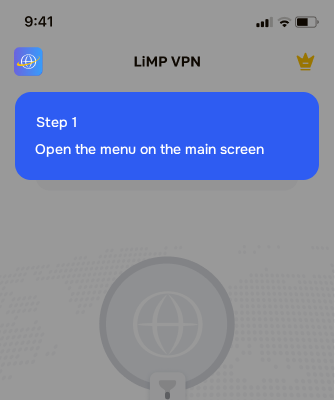
Go to settings
Tap the profile icon or the 'Account' section in the app settings.
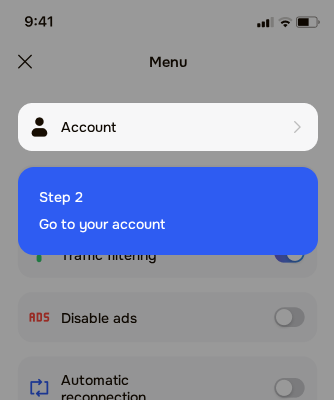
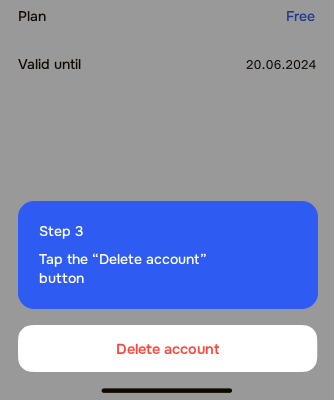
Tap 'Delete account'
Find the 'Delete account' option and tap it.
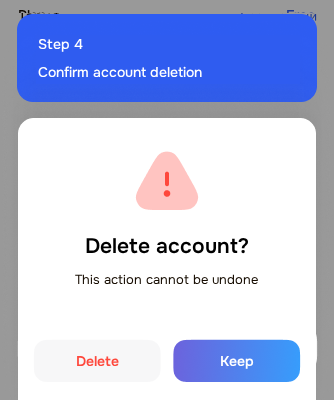
Confirm deletion
Read the warning and confirm the deletion. After that the account is deleted permanently.
Cannot delete the account from the app?
If you cannot delete the account on your own, write us at support@limpvpn.com with the subject 'Delete account', and we will help within 24 hours.
After account deletion, mandatory data retention periods apply under applicable law. See our Privacy Policy.